How to Choose a Leather Desk Pad That Fits Your Desk
Aysire Editorial
Share
Measure the mouse sweep before the desk. Which size, why leather for a workday desk, what OSHA says about wrist rests, and a size chart that fits on a phone.
1516 words,
7 minutes read time.
Last edited .
A desk pad is bought for the look and kept for the feel: the keyboard stops rattling, the mouse stops skating, the coffee ring lands on something that wipes, and the desk underneath stops collecting the scratches that a laptop leaves. Choosing one is mostly measurement, then material, then a question about your wrists that most guides skip. This guide runs the three in that order, answers the questions people search before buying, and ends with a size chart that fits on a phone screen.
What is the difference between a desk pad and a desk mat
In practice they are the same object sold to different desks. A desk pad usually means the firmer, thinner version in leather, felt or cork, sized for a keyboard and mouse or a writing space, and sold for offices. A desk mat usually means the larger, softer, rubber-backed fabric version that covers most of the desk and is sold for gaming. The words are used interchangeably by half the market, and even a leather desk accessories collection will carry both, so read the size, the material and the thickness rather than the name. A desk pad and a desk mat are the same idea: the pad is the firm office version and the mat the soft gaming one.
What is the best desk pad size for my office
Measure before you shop, in this order. First, the width of the desk. Second, the width of your keyboard plus your mouse plus the distance the mouse travels in a normal session, which for most people is about four inches to each side of where it rests. Third, whether the monitor stand or the laptop will sit on the pad or behind it; a monitor stand belongs behind the pad, because a pad under a stand cannot be lifted to clean and takes a permanent dent.
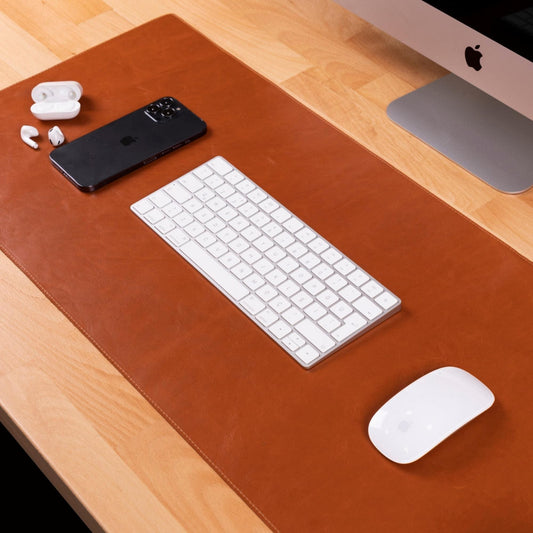
The best desk pad size covers the keyboard and the full mouse sweep with two inches to spare, and stops short of the monitor stand. On a 48-inch desk that is usually a pad between 24 and 36 inches wide; on a 60-inch desk a 36-inch pad still leaves room for a lamp and a notebook. A pad that spans the whole desk edge to edge looks tidy in a photograph and gathers every crumb on the desk; a pad two inches inside the edge on each side looks intentional and is easier to lift.
Which is better for a desk pad, felt or leather
Leather for a desk you work at every day, felt for a desk you want to look warm. Felt is soft, quiet and forgiving; it also drinks a spill, pills under a mouse over a year, and holds the shape of anything left on it. Leather is firmer, wipes clean, does not pill, and ages the way a wallet does, taking on a sheen where the hands rest. Leather is the better desk pad material for daily work because a spill wipes off and the surface improves with use instead of wearing out. Cork sits between the two, light and quiet and easy to mark. Vegan leather looks like leather for a year or two and then follows the rules of any coated fabric, none of which improve under a hot laptop.
What is the best material for a desk pad
It depends on the job the pad does most. For a writing desk, where the pad takes a pen, paper and a mug, full-grain leather: it is the only surface here that a pen glides on and a mug does not mark. For a keyboard desk, where the pad takes typing all day, leather or firm felt; both absorb the clatter. For a mouse desk, where tracking matters more than anything, a fabric-topped mat with a rubber base; an optical mouse reads a matte fabric surface more reliably than a glossy one. For a desk that doubles as a dining table, cork or leather, because both wipe. No single material wins every job, which is why the honest answer to the best material question is the one that names the job first.
How to choose a desk pad for work or for gaming
A work desk wants a pad that stays put, wipes clean and looks like furniture: leather, sized to the keyboard and mouse, in a color that reads as part of the desk. A gaming desk wants a mat that is large, low-friction and consistent for the mouse: fabric over rubber, often the full width of the desk, with a stitched edge so it does not fray under a forearm. The two can share a desk if the mat lives under the mouse only and the pad lives under the keyboard, but most people are better served by choosing the one that matches the hours. If the desk is a workday, buy the pad; if the desk is an evening, buy the mat. A leather pad is built for the first kind of desk.
Thickness, and the question about your wrists
A pad changes the height of the keyboard by its own thickness, and a thick pad under a thin keyboard raises the hands and bends the wrists back. Keep the pad thin, two to four millimeters, and keep the keyboard low. The federal workplace guidance on wrist supports is specific about where the hand should sit: OSHA's computer workstation guidance on wrist and palm supports says the hands should move freely above a rest while typing, that a rest should contact the heel of the palm rather than the wrist when you pause, and that a support should be fairly soft, rounded and at least an inch and a half deep. A wrist rest on a desk pad is for pauses, not typing, and it should meet the heel of the palm, not the wrist. A padded mouse pad with a built-in rest follows the same rule: the heel of the hand rests on it between movements, and the wrist floats during them.
Does a mouse work on a leather desk pad
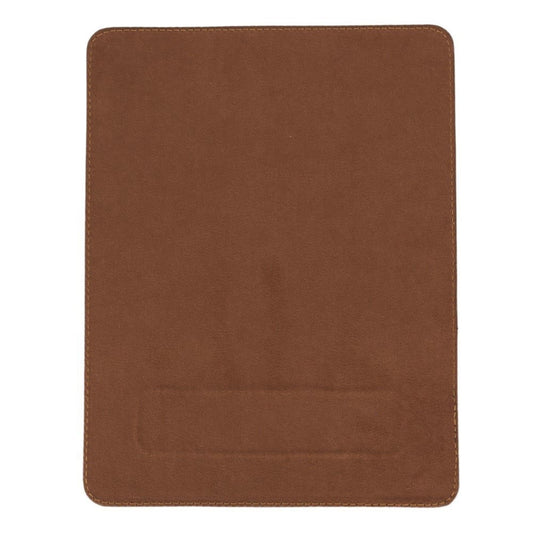
An optical mouse tracks on leather without trouble as long as the surface is matte and has some grain. Smooth patent or glossy finishes confuse the sensor; pebbled and lightly textured leather reads well, and so does a suede underside if the pad is reversible. Laser mice are fussier on very uniform surfaces and better on textured ones, which again favors a natural grain over a printed one. If the mouse skips, the cure is usually a different surface finish rather than a different mouse, and a small fabric mouse pad on top of the leather solves it in a second for the price of a coffee.
How to care for a leather desk pad
Wipe it with a dry cloth once a week and a barely damp one when something spills. Coffee and water rings come off within the hour and set within the day, so the pad earns a cloth in the drawer. Ink comes out of nothing, which is the one reason to keep a pen cap on. Condition it lightly twice a year with a cream made for leather, the same routine as a bag, and keep it out of direct sun, because a pad that sits in a window darkens on one side and fades on the other. The guide to full-grain leather covers why the surface improves instead of wearing through. Lift the pad every few weeks and wipe the desk under it; dust migrates under a pad and grinds into a wooden surface.
Desk mat size chart
The sizes below are the ones that recur across makers, with the desk width each suits; the same numbers apply to the mouse pads and desk pads in the accessories collection.
12 x 16 inches, 30 x 40 cm: a mouse pad with room for a notebook; any desk.
17 x 24 inches, 43 x 61 cm: keyboard and mouse on a compact desk under 40 inches wide.
18 x 32 inches, 45 x 80 cm: keyboard, mouse and a full sweep on a 48-inch desk.
17 x 36 inches, 43 x 91 cm: the standard large pad for a 55- to 60-inch desk.
24 x 47 inches, 60 x 120 cm: the full-width gaming mat for a 60-inch desk and beyond.
Which pad to buy first
Buy the pad in the size that clears the keyboard and the mouse sweep by two inches and stops before the monitor stand, in leather if the desk is a workday, thin enough that the keyboard stays low. Add the wrist rest only if you actually pause on it, and buy it separately if the pad you like does not have one. The leather desk pads are the version of this that ages well, and the rest of the desk, from the mouse pad to the pen tray, follows the same rules. Measure the sweep, choose the material by the job, keep it thin, and the desk pad will be the one thing on the desk you stop noticing, which is the point.
Seven items cover a week anywhere with a shower. The full dopp kit list in four groups, the airport rule that decides half of it, and the edit after every...
Seven items cover a week anywhere with a shower. The full dopp kit list in four groups, the airport rule that decides half of it, and the edit after every...
Chains knot in the first hour and rings vanish before sunscreen. Where jewelry flies, how each piece is packed, and the five things a travel case has to do.
Chains knot in the first hour and rings vanish before sunscreen. Where jewelry flies, how each piece is packed, and the five things a travel case has to do.
Two belts can carry the same size and fasten differently. Find the measurement detail to check before you choose, plus the shortcut that needs a second look.
Two belts can carry the same size and fasten differently. Find the measurement detail to check before you choose, plus the shortcut that needs a second look.
Full-grain is not a grade, and top grain means two opposite things. What the words on a leather listing actually tell you, and the five checks that settle it.
Full-grain is not a grade, and top grain means two opposite things. What the words on a leather listing actually tell you, and the five checks that settle it.